1. IPKO APN Settings for Android:
In the Menu go to Settings -> Wireless & networks-> Mobile networks -> Access Point Names -> add New APN and key the following settings
Internet APN Settings:
Name : Internet
APN : IPKO
Proxy : <Not Set>
Port : <Not Set>
Username : <Not Set>
Password : <Not Set>
Server : <Not Set>
MMSC : <Not Set>
MMS Proxy : <Not Set>
MMS Port : <Not Set>
MCC : 293
MNC : 41
Authentication type : <Not Set>
APN Type : default, supl (or ) Internet - for Samsung Galaxy)
MMS APN Settings:
Name : MMS
APN : IPKO
Proxy : <Not Set>
Port : <Not Set>
Username : <Not Set>
Password : <Not Set>
Server : <Not Set>
MMSC : http://mms.ipko.net" onclick="window.open(this.href);return false;
MMS Proxy : 213.229.249.40
MMS Port : 8080
MCC : 293
MNC : 41
Authentication type : <Not Set>
APN Type : mms
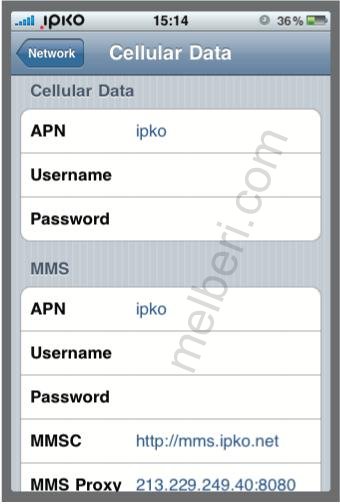
2. IPKO APN Settings for iPhone 4, 5/ iPad:
In the main menu -> Settings-> General Settings -> Network ->Turn ON Cellular Data ( Or Mobile Data Network) ->Select Cellular Network ( Or Mobile Data Network) -> new APN and type the following data there
Cellular Data:
APN: IPKO
Username: Blank
Password: Blank
MMS:
APN: IPKO
Username:Blank
Password: Blank
MMSC: http://mms.ipko.net" onclick="window.open(this.href);return false;
MMS Proxy: 213.229.249.40:8080
MMS Message Size: 307200
MMS UA Prof URL: default