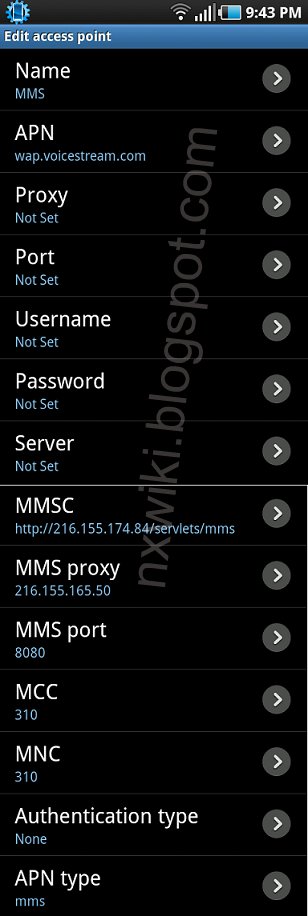
In the Menu go to Settings -> Wireless & networks-> Mobile networks -> Access Point Names -> add New APN and key the following settings
Internet APN Settings US:
Name : T-Mobile Net
APN : epc.tmobile.com
Proxy : <Not Set>
Port : <Not Set>
Username : <Not Set>
Password : <Not Set>
Server : <Not Set>
MMSC : <Not Set>
MMS Proxy : <Not Set>
MMS Port :<Not Set>
MCC : 310
MNC :260
Authentication type : <Not Set>
APN Type : internet
Internet / MMS APN Settings US:
Name : T-Mobile
APN : epc.tmobile.com or wap.voicestream.com
Proxy : <Not Set>
Port : <Not Set>
Username : <Not Set>
Password : <Not Set>
Server : <Not Set>
MMSC : http://mms.msg.eng.t-mobile.com/mms/wapenc" onclick="window.open(this.href);return false;
MMS Proxy : 216.155.165.50
MMS Port : 8080
MCC : 310
MNC :260
Authentication type : <Not Set>
APN Type : MMS