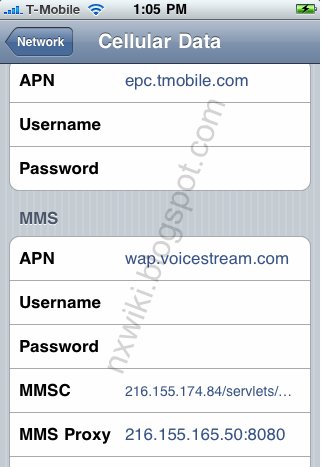
In the main menu -> Settings-> General -> Network->Turn ON Cellular Data Network (or Mobile Data Network) -> Select Cellular Data Network -> new APN and type the following data there
Cellular Data:
APN: epc.tmobile.com
Username: Blank
Password: Blank
MMS:
APN: epc.tmobile.com
Username:Blank
Password: Blank
MMSC: http://mms.msg.eng.t-mobile.com/mms/wapenc" onclick="window.open(this.href);return false;
MMS Proxy: 216.155.165.50:8080
MMS Message Size: 1048576
MMS UA Prof URL: default