DODO Mobile APN Settings for Android iPhone iPad MMS GPRS Setup
DODO Mobile APN Settings for Android:
In the
Menu go to Settings -> Wireless & networks-> Mobile networks -> Access Point Names -> add New APN and key the following settings
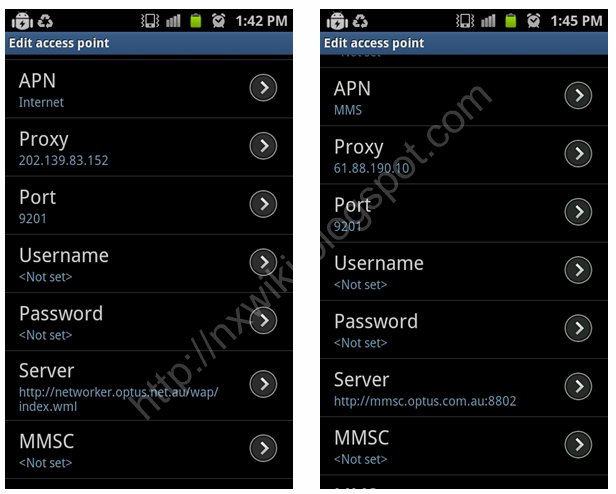
Internet APN Settings:
Name : GPRS
APN : internet
Proxy : 202.139.83.152
Port : 9201
Username : <Not Set>
Password : <Not Set>
Server :
http://networker.optus.net.au/wap/index.wml" onclick="window.open(this.href);return false;
MMSC : <Not Set>
MMS Proxy : <Not Set>
MMS Port : <Not Set>
MCC : 505
MNC : 02
Authentication type : <Not Set>
APN Type : default
MMS APN Settings:
Name : DODO MMS
APN : MMS
Proxy : <Not Set>
Port : <Not Set>
Username : <Not Set>
Password : <Not Set>
Server : <Not Set>
MMSC :
http://mmsc.optus.com.au:8002/" onclick="window.open(this.href);return false;
MMS Proxy : 61.88.190.10
MMS Port : 9201
MCC : 505
MNC : 02
Authentication type : <Not Set>
APN Type : mms
 DODO Mobile APN Settings for iPhone /iPad:
In the
main menu -> Settings-> General Settings -> Network ->Turn ON Cellular Data
Select Cellular Network -> new APN and type the following data there
Cellular Data:
APN: Internet
Username: Blank
Password: Blank
MMS:
APN: MMS
Username:Blank
Password: Blank
MMSC:
http://mmsc.optus.com.au:8002/" onclick="window.open(this.href);return false;
MMS Proxy: 61.88.190.10:9201
MMS Message Size: 300000
MMS UA Prof URL: default
[u][b][size=150]DODO Mobile APN Settings for Android iPhone iPad MMS GPRS Setup[/size][/b][/u]
[b][u][size=150]DODO Mobile APN Settings for Android:[/size][/u][/b]
In the [b]Menu go to Settings -> Wireless & networks-> Mobile networks -> Access Point Names -> add New APN[/b] and key the following settings
[u][b]Internet APN Settings:[/b][/u]
Name : GPRS
APN : internet
Proxy : 202.139.83.152
Port : 9201
Username : <Not Set>
Password : <Not Set>
Server : http://networker.optus.net.au/wap/index.wml" onclick="window.open(this.href);return false;
MMSC : <Not Set>
MMS Proxy : <Not Set>
MMS Port : <Not Set>
MCC : 505
MNC : 02
Authentication type : <Not Set>
APN Type : default
[u][b]MMS APN Settings:[/b][/u]
Name : DODO MMS
APN : MMS
Proxy : <Not Set>
Port : <Not Set>
Username : <Not Set>
Password : <Not Set>
Server : <Not Set>
MMSC : http://mmsc.optus.com.au:8002/" onclick="window.open(this.href);return false;
MMS Proxy : 61.88.190.10
MMS Port : 9201
MCC : 505
MNC : 02
Authentication type : <Not Set>
APN Type : mms
[img]http://3.bp.blogspot.com/-N1ZMP3U4SZA/UNiQXDrtdVI/AAAAAAAAV7Q/G5DNBvyHsbc/s1600/Dodo+APN+Settings+for+Android+MMS.png[/img]
[b][u][size=150]DODO Mobile APN Settings for iPhone /iPad:[/size][/u][/b]
In the [b]main menu -> Settings-> General Settings -> Network ->Turn ON Cellular Data
Select Cellular Network -> new APN [/b]and type the following data there
[b][u]Cellular Data:[/u][/b]
APN: Internet
Username: Blank
Password: Blank
[u][b]MMS:[/b][/u]
APN: MMS
Username:Blank
Password: Blank
MMSC: http://mmsc.optus.com.au:8002/" onclick="window.open(this.href);return false;
MMS Proxy: 61.88.190.10:9201
MMS Message Size: 300000
MMS UA Prof URL: default