by beril » Sun Sep 01, 2013 5:42 pm
Telus Internet MMS APN Settings for iPhone 4 iPad Canada
In the
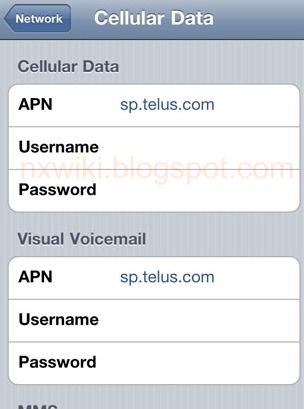
main menu -> Settings-> General Settings -> Network ->Turn ON Cellular Data ( Or Mobile Data Network) ->Select Cellular Network ( Or Mobile Data Network) -> new APN and type the following data there
Cellular Data:
APN: sp.telus.com
Username: Blank
Password: Blank
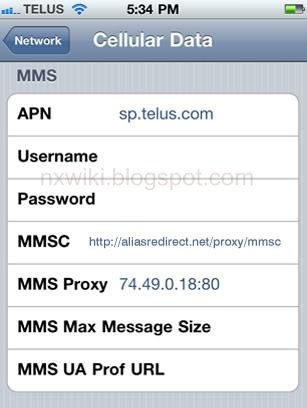
MMS:
APN: sp.telus.com
Username:Blank
Password: Blank
MMSC:
http://aliasredirect.net/proxy/mmsc" onclick="window.open(this.href);return false;
MMS Proxy: 74.49.0.18:80
MMS Message Size: 307200
MMS UA Prof URL: defaul
Tethering: APN: isp.telus.com
Smartphone APN : sp.telus.com
Mobile Internet Key, Mobile hotspot, Smart Hub, tablet APN : isp.telus.com
Feature phone APN : consumer.telus.com
[b][u][size=150]Telus Internet MMS APN Settings for iPhone 4 iPad Canada[/size][/u][/b]
In the [b]main menu -> Settings-> General Settings -> Network ->Turn ON Cellular Data ( Or Mobile Data Network) ->Select Cellular Network ( Or Mobile Data Network) -> new APN [/b]and type the following data there
[b][u]Cellular Data:[/u][/b]
APN: sp.telus.com
Username: Blank
Password: Blank
[u][b]MMS:[/b][/u]
APN: sp.telus.com
Username:Blank
Password: Blank
MMSC: http://aliasredirect.net/proxy/mmsc" onclick="window.open(this.href);return false;
MMS Proxy: 74.49.0.18:80
MMS Message Size: 307200
MMS UA Prof URL: defaul
[b]Tethering: [/b] APN: isp.telus.com
[b]Smartphone APN [/b]: sp.telus.com
[b]Mobile Internet Key, Mobile hotspot, Smart Hub, tablet APN :[/b] isp.telus.com
[b]Feature phone APN :[/b] consumer.telus.com
[img]http://3.bp.blogspot.com/-5dpGm-zHqDk/UXYrQIwXBBI/AAAAAAAAAiw/pXB29RESm_w/s1600/Telus+APN+settings+iphone+4.JPG[/img]
[img]http://3.bp.blogspot.com/-yga4XCXwKq8/UXYrQrA50BI/AAAAAAAAAjE/JjJzr3M6AxA/s1600/Telus+MMS+settings+iphone+4.JPG[/img]