by beril » Wed Jun 26, 2013 5:15 pm
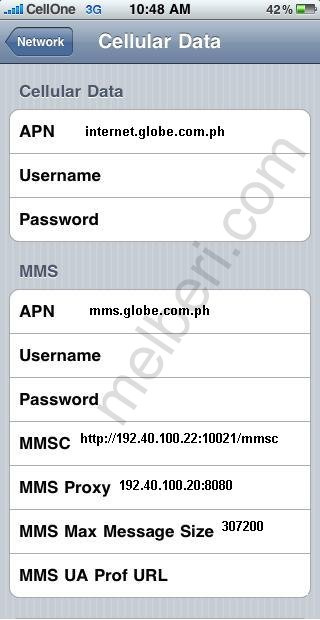
Globe Internet MMS APN Settings for iPhone iPad 3GS 4 5
In the
main menu -> Settings-> General Settings -> Network ->Turn ON Cellular Data ( Or Mobile Data Network) ->Select Cellular Network ( Or Mobile Data Network) -> new APN and type the following data there
Cellular Data:
APN: internet.globe.com.ph
Username: Blank
Password: Blank
MMS:
APN: mms.globe.com.ph
Username:Blank
Password: Blank
MMSC:
http://192.40.100.22:10021/mmsc" onclick="window.open(this.href);return false;
MMS Proxy: 192.40.100.20:8080
MMS Message Size: 307200
MMS UA Prof URL: default
[b][u][size=150]Globe Internet MMS APN Settings for iPhone iPad 3GS 4 5 [/size][/u][/b]
In the [b]main menu -> Settings-> General Settings -> Network ->Turn ON Cellular Data ( Or Mobile Data Network) ->Select Cellular Network ( Or Mobile Data Network) -> new APN [/b]and type the following data there
[b][u]Cellular Data:[/u][/b]
APN: internet.globe.com.ph
Username: Blank
Password: Blank
[u][b]MMS:[/b][/u]
APN: mms.globe.com.ph
Username:Blank
Password: Blank
MMSC: http://192.40.100.22:10021/mmsc" onclick="window.open(this.href);return false;
MMS Proxy: 192.40.100.20:8080
MMS Message Size: 307200
MMS UA Prof URL: default
[img]http://4.bp.blogspot.com/-PGcLUSNN1FM/Ucsgr89EzwI/AAAAAAAAXPs/TGcGoPDNpEg/s1600/Globe+APN+Settings+for+iPhone+5+iPad.JPG[/img]