Cara Setting 3G MMS Internet APN Indosat di Android HTC Samsung Galaxy
MATRIX APN Settings for Android Smart Phones:
In the
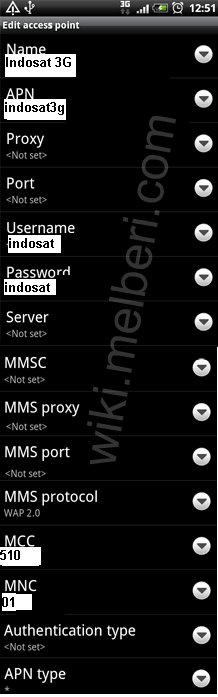
Menu go to Settings -> Wireless & networks-> Mobile networks -> Access Point Names -> add New APN and key the following settings
Internet APN Settings:
Name : Indosat 3G
APN : indosat3g ( or GPRS Volume Based - indosatgprs )
Proxy : 10.19.19.19
Port : 8080
Username : indosat
Password :indosat
Server : <Not Set>
MMSC : <Not Set>
MMS Proxy : <Not Set>
MMS Port : <Not Set>
MCC : 510
MNC : 01
Authentication type : <Not Set>
APN Type : default, supl
MMS APN Settings:
Name : MMS
APN : indosatmms
Proxy : <Not Set>
Port : <Not Set>
Username : indosat
Password : indosat
Server : <Not Set>
MMSC :
http://mmsc.indosat.com" onclick="window.open(this.href);return false;
MMS Proxy : 10.19.19.19
MMS Port : 8080
MCC : 510
MNC : 01
Authentication type : <Not Set>
APN Type : mms
 GPRS Volume Based
APN: indosatgprs
User : indosat
Pass : indosat
Proxy : 10.19.19.19
Port : 8080
Homepage :
http://wap.indosat.com" onclick="window.open(this.href);return false;
MMS
APN: indosatmms
User : indosat
Pass : indosat
Proxy : 10.19.19.19
Port : 8080
Homepage :
http://mmsc.indosat.com" onclick="window.open(this.href);return false;
3G Broadband :
APN: indosat3g
User : indosat
Pass : indosat
Proxy : 10.19.19.19
Port : 8080
Homepage :
http://wap3g.indosat.com" onclick="window.open(this.href);return false;
WAP StarOne:
Proxy: 192.168.50.60
Port: 9401 (WAP 2.0), 9201 (WAP 1.0)
User: wap
Pass: wap
Homepage:
http://wap.indosat.com" onclick="window.open(this.href);return false;
[b][u][size=150]Cara Setting 3G MMS Internet APN Indosat di Android HTC Samsung Galaxy[/size][/u][/b]
[b][u]MATRIX APN Settings for Android Smart Phones:[/u][/b]
In the [b]Menu go to Settings -> Wireless & networks-> Mobile networks -> Access Point Names -> add New APN [/b]and key the following settings
[u][b]Internet APN Settings:[/b][/u]
Name : Indosat 3G
APN : indosat3g ( or GPRS Volume Based - indosatgprs )
Proxy : 10.19.19.19
Port : 8080
Username : indosat
Password :indosat
Server : <Not Set>
MMSC : <Not Set>
MMS Proxy : <Not Set>
MMS Port : <Not Set>
MCC : 510
MNC : 01
Authentication type : <Not Set>
APN Type : default, supl
[u][b]MMS APN Settings:[/b][/u]
Name : MMS
APN : indosatmms
Proxy : <Not Set>
Port : <Not Set>
Username : indosat
Password : indosat
Server : <Not Set>
MMSC : http://mmsc.indosat.com" onclick="window.open(this.href);return false;
MMS Proxy : 10.19.19.19
MMS Port : 8080
MCC : 510
MNC : 01
Authentication type : <Not Set>
APN Type : mms
[img]http://3.bp.blogspot.com/-x-G36EMqsJA/UX1cgYtqwhI/AAAAAAAAA7k/HPvUCcVt32U/s1600/Cara+Setting+Internet+Indosat+di+Android+HTC+Nexus.GIF[/img]
[b][u]GPRS Volume Based[/u][/b]
APN: indosatgprs
User : indosat
Pass : indosat
Proxy : 10.19.19.19
Port : 8080
Homepage : http://wap.indosat.com" onclick="window.open(this.href);return false;
[u][b]MMS[/b][/u]
APN: indosatmms
User : indosat
Pass : indosat
Proxy : 10.19.19.19
Port : 8080
Homepage : http://mmsc.indosat.com" onclick="window.open(this.href);return false;
[b][u]3G Broadband :[/u][/b]
APN: indosat3g
User : indosat
Pass : indosat
Proxy : 10.19.19.19
Port : 8080
Homepage : http://wap3g.indosat.com" onclick="window.open(this.href);return false;
[b][u]WAP StarOne:[/u][/b]
Proxy: 192.168.50.60
Port: 9401 (WAP 2.0), 9201 (WAP 1.0)
User: wap
Pass: wap
Homepage: http://wap.indosat.com" onclick="window.open(this.href);return false;