by beril » Thu May 09, 2013 4:50 pm
Truphone APN settings for iPhone iPad Android Windows Lumia UK
1. Truphone APN Settings for Android:
In the
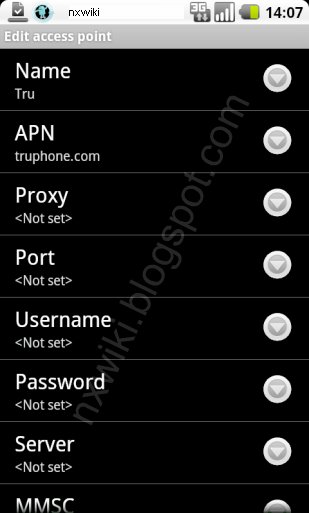
Menu go to Settings -> Wireless & networks-> Mobile networks -> Access Point Names -> add New APN and key the following settings
Name : GPRS
APN : truphone.com
Proxy : <Not Set>
Port : <Not Set>
Username : <Not Set>
Password : <Not Set>
Server : <Not Set>
MMSC : <Not Set>
MMS Proxy : <Not Set>
MMS Port : <Not Set>
MCC : 234
MNC : 25
Authentication type : <Not Set>
APN Type : default
 2. APN Settings for iPhone:
In the
main menu -> Settings-> General Settings -> Network ->Turn ON Cellular Data
Select Cellular Network -> new APN and type the following data there
Cellular Data:
APN: truphone.com
Username: Blank
Password: Blank
MMS:
APN: Blank
Username:Blank
Password: Blank
MMSC: Blank
MMS Proxy: Blank
MMS Message Size: Blank
MMS UA Prof URL: default
3. Internet Settings for Nokia Lumia /Windows 8 Mobiles:
Go to
Settings -> Access Point -> Add a New Profile
Connection Name:
Internet APN:
Access Point Name: truphone.com
Username: Blank
Password:
Proxy address:
Proxy port
Network type : IPv4
Authentication Type: none
Leave all other blank
and save the settings.
[u][b][size=150]Truphone APN settings for iPhone iPad Android Windows Lumia UK
[/size][/b][/u]
[u][b]1. Truphone APN Settings for Android:
[/b][/u]
In the [b]Menu go to Settings -> Wireless & networks-> Mobile networks -> Access Point Names -> add New APN[/b] and key the following settings
Name : GPRS
APN : truphone.com
Proxy : <Not Set>
Port : <Not Set>
Username : <Not Set>
Password : <Not Set>
Server : <Not Set>
MMSC : <Not Set>
MMS Proxy : <Not Set>
MMS Port : <Not Set>
MCC : 234
MNC : 25
Authentication type : <Not Set>
APN Type : default
[img]http://4.bp.blogspot.com/-sC62BDqTYz4/UXYrT8Aw1RI/AAAAAAAAAkg/gtbZPiVJjBI/s1600/Truphone+UK+APN+settings+for+Android.jpg[/img]
[b][u]2. APN Settings for iPhone:
[/u][/b]In the [b]main menu -> Settings-> General Settings -> Network ->Turn ON Cellular Data
Select Cellular Network -> new APN [/b]and type the following data there
[b][u]Cellular Data:[/u][/b]
APN: truphone.com
Username: Blank
Password: Blank
[u][b]MMS:[/b][/u]
APN: Blank
Username:Blank
Password: Blank
MMSC: Blank
MMS Proxy: Blank
MMS Message Size: Blank
MMS UA Prof URL: default
[u][b]3. Internet Settings for Nokia Lumia /Windows 8 Mobiles:[/b][/u]
Go to [b]Settings -> Access Point -> Add a New Profile[/b]
Connection Name:
[u]Internet APN:[/u]
Access Point Name: truphone.com
Username: Blank
Password:
Proxy address:
Proxy port
Network type : IPv4
Authentication Type: none
Leave all other blank
and save the settings.