Three UK APN Settings for Android HTC iPhone iPad Blackberry Nokia
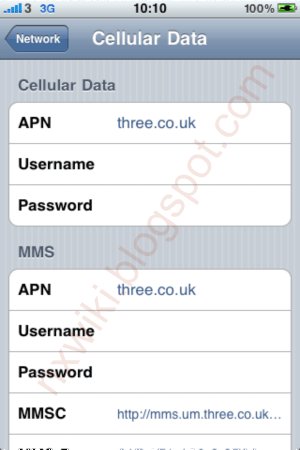
1. 3 UK APN Settings for iPhone /iPad
In the
main menu -> Settings-> General -> Network->Turn ON Cellular Data Network (or Mobile Data Network)-> Select Cellular Data Network -> new APN and type the following data there
Cellular Data:
APN: three.co.uk
Username: Blank
Password: Blank
MMS:
APN: three.co.uk
Username: blank
Password: blank
MMSC:
http://mms.um.three.co.uk:10021/mmsc" onclick="window.open(this.href);return false;
MMS Proxy: 217.171.129.2:8799
MMS Message Size: 307200
MMS UA Prof URL: Blank
 2. Three UK APN Settings for Android Mobiles:
Internet Settings for HTC / Samsung Galaxy / Google Nexus / Sony Ericsson
2. Three UK APN Settings for Android Mobiles:
Internet Settings for HTC / Samsung Galaxy / Google Nexus / Sony Ericsson
In your Android Mobile Menu go to
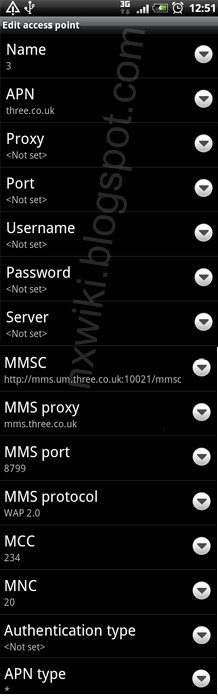
Settings -> Wireless & networks-> Mobile networks -> Access Point Names -> add New APN and key the following settings.
GPRS/MMS Settings:
Name : 3 UK
APN : three.co.uk
Proxy : <Not Set>
Port : <Not Set>
Username : <Not Set>
Password : < Not Set >
Server : <Not Set>
MMSC :
http://mms.um.three.co.uk:10021/mmsc" onclick="window.open(this.href);return false;
MMS proxy : 217.171.129.2
MMS port : 8799
MMS protocol : WAP 2.0
MCC : 234
MNC : 20
APN type : internet + mms
 Only Internet Settings:
Name : 3 GPRS
APN : three.co.uk
Proxy : <Not Set>
Port : <Not Set>
Username : <Not Set>
Password : < Not Set >
Server : <Not Set>
MMSC : <Not Set>
MMS proxy : <Not Set>
MMS port : <Not Set>
MMS protocol : WAP 2.0
MCC : 234
MNC : 20
APN type : default
Three MMS APN Settings:
Name : 3 MMS
APN : three.co.uk
Proxy : <Not Set>
Port : <Not Set>
Username : <Not Set>
Password : < Not Set >
Server : <Not Set>
MMSC :
http://mms.um.three.co.uk:10021/mmsc" onclick="window.open(this.href);return false;
MMS proxy : 217.171.129.2
MMS port : 8799
MMS protocol : WAP 2.0
MCC : 234
MNC : 20
APN type : mms
3. Three GPRS/MMS Settings for Nokia Mobiles:
GPRS Settings:
Connection Namd : 3Internet
Access Point Name : three.co.uk
User Name : blank
Password : Blank
MMS Settings:
Connection Namd : 3MMS
Access Point Name : three.co.uk
User Name : blank
Password : Blank
MMSC :
http://mms.um.three.co.uk:10021/mmsc" onclick="window.open(this.href);return false;
MMS proxy IP: 217.171.129.2
MMS port : 8799
4. Three Internet Settings for Blackberry:
From the
main screen -> Select Options -> Advanced System Settings -> TCP IP
Enable APN Settings and enter the below mentioned apn details there
APN: internet.mtn.com.af
Username: Blank
Password: Blan
Back to main scenario menu
[b][u][size=150]Three UK APN Settings for Android HTC iPhone iPad Blackberry Nokia[/size][/u][/b]
[b][u]1. 3 UK APN Settings for iPhone /iPad[/u][/b]
In the [b]main menu -> Settings-> General -> Network->Turn ON Cellular Data Network (or Mobile Data Network)-> Select Cellular Data Network -> new APN [/b]and type the following data there
[b][u]Cellular Data:[/u][/b]
APN: three.co.uk
Username: Blank
Password: Blank
[b][u]MMS:[/u][/b]
APN: three.co.uk
Username: blank
Password: blank
MMSC: http://mms.um.three.co.uk:10021/mmsc" onclick="window.open(this.href);return false;
MMS Proxy: 217.171.129.2:8799
MMS Message Size: 307200
MMS UA Prof URL: Blank
[img]http://2.bp.blogspot.com/-DnUrYR3Fr1o/UXYrRTiESeI/AAAAAAAAAjY/_63aQEpt9bE/s1600/Three+UK+APN+Settings+for+iPhone+Ipad.GIF[/img]
[u][b]2. Three UK APN Settings for Android Mobiles:[/b][/u]
[b]Internet Settings for HTC / Samsung Galaxy / Google Nexus / Sony Ericsson [/b]
In your Android Mobile Menu go to [b]Settings -> Wireless & networks-> Mobile networks -> Access Point Names -> add New APN[/b] and key the following settings.
[b][u]GPRS/MMS Settings:[/u][/b]
Name : 3 UK
APN : three.co.uk
Proxy : <Not Set>
Port : <Not Set>
Username : <Not Set>
Password : < Not Set >
Server : <Not Set>
MMSC : http://mms.um.three.co.uk:10021/mmsc" onclick="window.open(this.href);return false;
MMS proxy : 217.171.129.2
MMS port : 8799
MMS protocol : WAP 2.0
MCC : 234
MNC : 20
APN type : internet + mms
[img]http://1.bp.blogspot.com/-7FX4e-_1LOU/UXYrRDo228I/AAAAAAAAAjQ/CGlJklYtBdw/s1600/Three+UK+APN+Settings+for+Android.gif[/img]
[b][u]Only Internet Settings:[/u][/b]
Name : 3 GPRS
APN : three.co.uk
Proxy : <Not Set>
Port : <Not Set>
Username : <Not Set>
Password : < Not Set >
Server : <Not Set>
MMSC : <Not Set>
MMS proxy : <Not Set>
MMS port : <Not Set>
MMS protocol : WAP 2.0
MCC : 234
MNC : 20
APN type : default
[b][u]Three MMS APN Settings:[/u][/b]
Name : 3 MMS
APN : three.co.uk
Proxy : <Not Set>
Port : <Not Set>
Username : <Not Set>
Password : < Not Set >
Server : <Not Set>
MMSC : http://mms.um.three.co.uk:10021/mmsc" onclick="window.open(this.href);return false;
MMS proxy : 217.171.129.2
MMS port : 8799
MMS protocol : WAP 2.0
MCC : 234
MNC : 20
APN type : mms
[b][u]3. Three GPRS/MMS Settings for Nokia Mobiles:[/u][/b]
[u]GPRS Settings:[/u]
Connection Namd : 3Internet
Access Point Name : three.co.uk
User Name : blank
Password : Blank
[u]MMS Settings:[/u]
Connection Namd : 3MMS
Access Point Name : three.co.uk
User Name : blank
Password : Blank
MMSC : http://mms.um.three.co.uk:10021/mmsc" onclick="window.open(this.href);return false;
MMS proxy IP: 217.171.129.2
MMS port : 8799
[u][b]4. Three Internet Settings for Blackberry:[/b][/u]
From the [b]main screen -> Select Options -> Advanced System Settings -> TCP IP[/b]
Enable APN Settings and enter the below mentioned apn details there
APN: internet.mtn.com.af
Username: Blank
Password: Blan
Back to main scenario menu